Affichage des articles dont le libellé est linux. Afficher tous les articles

mercredi 8 juillet 2015

Kali linux 2.0 coming August 11th 2015


Ever since its debut in the year 2013, Kali Linux users were waiting for a new and revamped version of the hack-friendly OS. Now Kali Linux developers  announced the next version-Kali Sana.
This popular hacking and penetration testing platform will release Kali Linux 2.0, codenamed Kali Sana, on August 11, 2015. Kali Linux has been a widely successful system developed by Offensive Security through the rewrite of BackTrack, another forensics Linux distribution.
The team working on Kali Linux 2.0 says that the new platform is full of the most powerful features for digital forensics. The next version will be showcased at the DEF CON hacking confab in August.
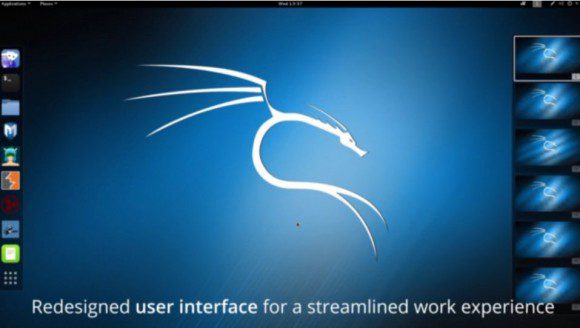
The team says: “We’ve been awfully quiet lately, which usually means something is brewing below the surface.” Kali Linux 2.0 features a revamped and streamlined user interface, new menus and brand-new testing tools. The developer team refuses to go deep into the details but here are some know details about the platform:
  1. The core set tools in Kali will be weekly updated.
  2. Kali UI is redesigned for a streamlined working environment.
  3. Native support for Ruby 2.0 for faster Metasploit load times.
  4.  Built in screencasting and desktop notifications.
  5. Cutting-edge wireless penetration tools and more.
At Black Hat Vegas 2015, Kali team is organizing free Kali 2.0 Dojo Workshop where they will be showcasing the most advanced features in Kalo 2.0.
https://www.bitblokes.de/wp-content/uploads/2015/07/kali-linux-2-0-desktop-580x328.jpg 
http://lamiradadelreplicante.com/wp-content/uploads/2015/07/kali-desktop-600x400.jpg


dimanche 28 juin 2015

The Raspberry Pi


The Raspberry Pi is a series of credit card-sized single-board computers developed in the UK by the Raspberry Pi Foundation with the intention of promoting the teaching of basic computer science in schools
The original Raspberry Pi is based on the Broadcom BCM2835 system on a chip (SoC), which includes an ARM1176JZF-S 700 MHz processor, VideoCore IV GPU, and was originally shipped with 256 megabytes of RAM, later upgraded (models B and B+) to 512 MB. The system has Secure Digital (SD) (models A and B) or MicroSD (models A+ and B+) sockets for boot media and persistent storage

Best Operating Systems


An operating system (OS) is software that manages computer hardware resources and provides common services for computer programs. The operating system is an essential component of the system software in a computer system. Application programs usually require an operating system to function. Time-sharing operating systems schedule tasks for efficient use of the system and may also include accounting software for cost allocation of processor time, mass storage, printing, and other resources. Below are Best Operation System:

Ubuntu
Ubuntu is a popular linux based distribution , developed by canonical corporations. Designed to work beautifully on the lastest laptops, desktops and touch screen devices, it looks incredible on high resolution screens — and with touch screen enhancements and interface refinements including individual menu bars in each application window, it’s now even easier to use.

Windows 8.1
Windows 8.1 is a version of Windows NT family of operating systems and an upgrade for Windows 8.
Windows 8.1 is available free of charge for retail copies of Windows 8 and Windows RT users via Windows Store. Unlike service packs on previous versions of Windows, users who obtained 8 outside of retail copies or pre-loaded installations must obtain 8.1 through new installation media from their respective subscription or enterprise channel.

Macintosh
The Macintosh, marketed as Mac, is a line of personal computers (PCs) designed, developed, and marketed by Apple Inc. It was initially targeted mainly at the home, education, and creative professional markets. Since the introduction of the Macintosh, the computer has seen significant evolution, now making it one of the most powerful general purpose computers on the market. It now targets the business, science, and law markets as well.

Windows 7
Windows 7 is a personal computer operating system developed by Microsoft, a version of Windows NT. Development of 7 occurred as early as 2006 under the codename "Blackcomb". Windows 7 was released to manufacturing on July 22, 2009, and became generally available on October 22, 2009, less than three years after the release of its predecessor, Windows Vista. Windows 7's server counterpart, Windows Server 2008 R2, was released at the same time.

Fedora
Fedora is an operating system based on the Linux kernel, developed by the community-supported Fedora Project and owned by Red Hat. Fedora contains software distributed under a free and open source license and aims to be on the leading edge of such technologies.
Linux Mint
Linux Mint is an Ubuntu-based distribution whose goal is to provide a more complete out-of-the-box experience by including browser plugins, media codecs, support for DVD playback, Java and other components. It also adds a custom desktop and menus, several unique configuration tools, and a web-based package installation interface. Linux Mint is compatible with Ubuntu software repositories.

Debian
Debian is an operating system composed of free software mostly carrying the GNU General Public License. The operating system is developed by an internet collaboration of volunteers aligned with The Debian Project. Debian GNU/Linux is one of the most popular Linux distributions for personal computers and network servers
OpenSuse
openSUSE is a free and Linux-based operating system for your PC, Laptop or Server. openSUSE is a general purpose operating system built on top of the Linux kernel, developed by the community-supported openSUSE Project and sponsored by SUSE and a number of other companies. After Novell acquired SUSE Linux in January 2004, Novell decided to release the SUSE Linux Professional product as a 100% open source project.

Sun Solaris
Solaris is a Unix operating system originally developed by Sun Microsystems. It superseded their earlier SunOS in 1993. Solaris is known for its scalability, especially on SPARC systems, and for originating many innovative features such as DTrace, ZFS and Time Slider. Solaris supports SPARC-based and x86-based workstations and servers from Oracle and other vendors, with efforts underway to port to additional platforms. Solaris is registered as compliant with the Single Unix Specification.

Mandriva
Mandriva Linux was launched in 1998 under the name of Mandrake Linux, with the goal of making Linux easier to use for everyone. At that time, Linux was already well-known as a powerful and stable operating system that demanded strong technical knowledge and extensive use of the command line; MandrakeSoft saw this as an opportunity to integrate the best graphical desktop environments and contribute its own graphical configuration utilities to quickly become famous for setting the standard in Linux ease of use. In February 2005, MandrakeSoft merged with Brazil's Conectiva to form Mandriva S.A., with headquarters in Paris, France. The company's flagship product, Mandriva Linux, offers all the power and stability of Linux to both individuals and professional users in an easy-to-use and pleasant environment. -


How To Install Google Earth on Kali Linux

Google earth according to wikipedia is: “… virtual globe program that was originally called Earth Viewer and was created by Keyhole, Inc. It maps the earth by the superimposition of images obtained from satellite imagery, aerial photography and GIS 3D globe. It is available under three different licenses: Google Earth, a free version with limited functionality; Google Earth Plus ($20 per year), which includes additional features; and Google Earth Pro ($400 per year), which is intended for commercial use” 


So, how could we install it on our Debian or Ubuntu system?, it is really easy now. First we need to Google Earth package, to be able to create the .deb file. Let’s start. Open Terminal root@kali:~# apt-get install lbs-core Then open browser and enter URL: http://www.google.com/earth/download/ge/agree.html Then select your download package and download it. Then open terminal and install the Google Earth: root@kali:~# dpkg -i google-earth-stable_current_i386.deb To open Google Earth, open Terminal: root@kali:~# google-earth All Done! - See more at: http://www.iexplo1t.com/2015/06/GoogleEarth.html#sthash.zQUBqyiB.dpuf

Source: http://www.iexplo1t.com/2015/06/GoogleEarth.html

So, how could we install it on our Debian or Ubuntu system?,it is really easy now.

First we need to Google Earth package,


Open Terminal:

 root@kali:~# apt-get install lbs-core 

Then open browser and enter URL: Google earth download

Then select your download package and download it. 

 Then open terminal and install the Google Earth:

 root@kali:~# dpkg -i google-earth-stable_current_i386.deb 

To open Google Earth, open Terminal:

 root@kali:~# google-earth 
Google earth according to wikipedia is: “… virtual globe program that was originally called Earth Viewer and was created by Keyhole, Inc. It maps the earth by the superimposition of images obtained from satellite imagery, aerial photography and GIS 3D globe. It is available under three different licenses: Google Earth, a free version with limited functionality; Google Earth Plus ($20 per year), which includes additional features; and Google Earth Pro ($400 per year), which is intended for commercial use” - See more at: http://www.iexplo1t.com/2015/06/GoogleEarth.html#sthash.YuIdmh4Y.dpuf

Source: http://www.iexplo1t.com/2015/06/GoogleEarth.html
Google earth according to wikipedia is: “… virtual globe program that was originally called Earth Viewer and was created by Keyhole, Inc. It maps the earth by the superimposition of images obtained from satellite imagery, aerial photography and GIS 3D globe. It is available under three different licenses: Google Earth, a free version with limited functionality; Google Earth Plus ($20 per year), which includes additional features; and Google Earth Pro ($400 per year), which is intended for commercial use” - See more at: http://www.iexplo1t.com/2015/06/GoogleEarth.html#sthash.YuIdmh4Y.dpuf

Source: http://www.iexplo1t.com/2015/06/GoogleEarth.html
Google earth according to wikipedia is: “… virtual globe program that was originally called Earth Viewer and was created by Keyhole, Inc. It maps the earth by the superimposition of images obtained from satellite imagery, aerial photography and GIS 3D globe. It is available under three different licenses: Google Earth, a free version with limited functionality; Google Earth Plus ($20 per year), which includes additional features; and Google Earth Pro ($400 per year), which is intended for commercial use” - See more at: http://www.iexplo1t.com/2015/06/GoogleEarth.html#sthash.ILLyfIaP.dpuf

Source: http://www.iexplo1t.com/2015/06/GoogleEarth.html

Hiren's BootCD


Hiren's BootCD (also known as HBCD) is a bootable software CD containing a number of diagnostic programs such as partitioning agents, system performance benchmarks, disk cloning and imaging tools, data recovery tools, MBR tools, BIOS tools, and many others for fixing various computer problems. HBCD can be considered a valuable tool[1] for use in troubleshooting and recovery of computers.
As it is bootable, the operating system of the computer need not be available for the tools to be usable. All that is required is that the computer is able to run Microsoft Windows and Linux. Most of the tools are also available when the operating system is already running.


vendredi 26 juin 2015

How To Repair Kali Linux Grub With Kali Linux Live Cd: Dual Boot With Windows 7

This is a guide of how to repair grub in the event your windows 7 removed the grub during the installation
First thing that you'll need to do is to boot from a kali linux live cd. After that, go to gparted so that you can get to see where kali was installed: usually it's in the file system that ends with ext4, depending with the file system you used during the installation. In my case, the kali linux system was in sda3, but it varies with different systems.
From there, you'll have to use the terminal for the following commands:

Code:
mount /dev/sda3 /mnt
mount --bind /dev /mnt/dev
mount --bind /dev/pts /mnt/dev/pts
mount --bind /proc /mnt/proc
mount --bind /sys /mnt/sys
chroot /mnt
grub-install /dev/sda
update-grub
exit
umount /mnt/dev/pts
umount /mnt/dev
umount /mnt/proc
umount /mnt/sys
umount /mnt

This will restore the old kali linux boot loader, however, you will have to boot into kali once the live cd is out, so as to add windows into the boot loader. Once booted, go to the terminal and do the following:


Code:
os-prober
update-grub

Play Windows PC Games On Linux Ubuntu With Game Drift


Game Drift Linux is a new Linux distribution based on Ubuntu Linux. Game Drift has

been optimized to deliver to you the best possible gaming experience on Linux.
  
Windows games on Game Drift

You can play more than 1.200 popular Windows games directly within Game Drift Linux,  - and support for new games are added regularly. Play popular titles such as Need for Speed - Most Wanted, Counter-Strike Source, Hitman, and many other fantastic games .

System requirements
 A computer with the following configuration is recommended.

     •  1-2 Ghz processor (32 or 64 bit)
     •  1-2 GB memory
     •  4 GB hard disk drive for Game Drift Linux (excl. games)
     •  ATI, NVidia or Intel graphics adapter suitable for games
     •  LAN/Internet

Download:
 Download for 32 bit pc :   ISO 614 MB 
  Download for 64 bit pc :   ISO 691MO

jeudi 25 juin 2015

Kali Linux NetHunter


The Kali Linux NetHunter project is the first Open Source Android penetration testing platform for Nexus devices, created as a joint effort between the Kali community member “BinkyBear” and Offensive Security. NetHunter supports Wireless 802.11 frame injection, one-click MANA Evil Access Point setups, HID keyboard (Teensy like attacks), as well as BadUSB MITM attacks – and is built upon the sturdy shoulders of the Kali Linux distribution and toolsets. Whether you have a Nexus 5, Nexus 6, Nexus 7, Nexus 9, Nexus 10 or OnePlus One we’ve got you covered. Our freely downloadable images come with easy to follow installation and setup instructions to get you up and running in no time at all.


Download Net Hunter : here

How to run Windows software in Linux


Linux is more capable than ever. With over 1000 Linux games available on Steam and a general shift towards more web-based desktop software,

But, as most dedicated Linux desktop users will eventually discover, there comes a time when you just need to run a particular piece of Windows software on your Linux PC.
There are quite a few ways to do so. Here’s what you need to know:
ADVERTISING

Wine

Wine is a way to run Windows software on Linux, but with no Windows required.
Wine is an open-source “Windows compatibility layer” that can run Windows programs directly on your Linux desktop. Essentially, this open-source project is attempting to re-implement enough of Windows from scratch that it can run all those Windows applications without actually needing Windows.

This is the only method here that won’t actually require a copy of Windows, but the downside is that it won’t run every application properly. You may encounter bugs or performance issues, especially if you’re using Wine to play video games. But if you’re running a popular game released a few years ago, you may find that it performs very well. Many people use Wine to play World of Warcraft on Linux, for example. You can get an idea of how an application will run and any tweaks it might require by visiting the Wine Application Database website and searching for that application.


Virtual machines

Virtual machines are a very convenient way to run Windows software on your Linux PC. As PCs have gotten faster, virtual machines have become comparatively more lightweight.

This process involves installing a copy of Windows in a “virtual machine” program like VirtualBox, VMware, or Linux’s built-in KVM (Kernel-based Virtual Machine) solution. That copy of Windows thinks it’s running on real hardware, but it’s really running in window on your desktop. Modern virtual-machine solutions can even break Windows programs running in the virtual machine out of that window, allowing them to act like normal windows on your Linux desktop.


Dual-booting

Dual-booting isn’t technically a way to run Windows software on Linux itself, but it is how many Linux users run Windows software. Rather than using it directly under Linux, you just reboot your computer, choose Windows, and boot into Microsoft’s operating system. The Windows software can then run in its native environment. Thanks to modern solid-state drives, that reboot process should be faster than ever.


©2015 DT TECH. All rights resevered.Designed by Oussama

Back To Top